SmartCallMonitor2.0.1
Publisher Description
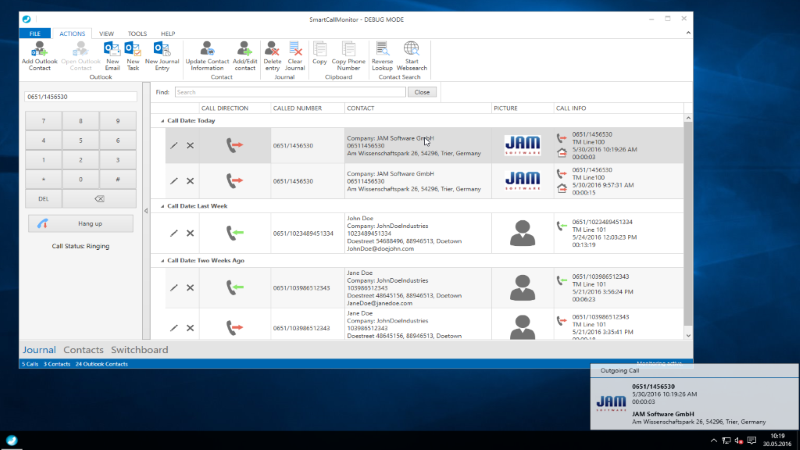
SmartCallMonitor is the easy-to-use calling and monitoring software for TAPI capable hardware like a telephone system or an ISDN card. It automatically tries to match incoming phone calls with data stored in your MS-Outlook contacts to provide information about the caller (e.g. name, address etc.). Information will be shown in a clearly arranged datasheet. If SmartCallMonitor can not find matching information about the caller in your MS-Outlook contacts it can use an internet reverse search service to obtain information about the caller.
With SmartCallMonitor you always know who is calling and whose call you could not answer. SmartCallMonitor can simplify your daily office routine by monitoring incoming calls, saving information about the caller (e.g. time and date of each call), creating call back reminder and many other features.
SmartCallMonitor V1.0 full functional version is completely free.
About SmartCallMonitor
This Other Comms Tools program is available in English, German. It was last updated on 29 September, 2026. SmartCallMonitor is compatible with the following operating systems: Windows.
The company that develops SmartCallMonitor is JAM Software GmbH. The latest version released by its developer is 2.0.1. This version was rated by 8 users of our site and has an average rating of 4.0.
The download we have available for SmartCallMonitor has a file size of 17.8 MB. Just click the green Download button above to start the downloading process. The program is listed on our website since 2016-11-07 and was downloaded 465 times. We have already checked if the download link is safe, however for your own protection we recommend that you scan the downloaded software with your antivirus. Your antivirus may detect the SmartCallMonitor as malware if the download link is broken.
How to install SmartCallMonitor on your Windows device:
- Click on the Download button on our website. This will start the download from the website of the developer.
- Once the SmartCallMonitor is downloaded click on it to start the setup process (assuming you are on a desktop computer).
- When the installation is finished you should be able to see and run the program.
Program Details
System requirements
Download information
Pricing
Version History
version 2.0.1
posted on 2016-11-07
* NEW modern user interface
* NEW Various call management options
* NEW views for journal and contacts implemented
* NEW switchboard functions: status, hold, transfer,...
* Further improvement of resolving area codes
* Optional notification window for missed calls
* Some minor improvements
version 1.0.1
posted on 2008-12-17
* Smart Call Monitor now can edit Outlook contacts
* Bugfix: improved handling of incoming calls / caller ID now works with AVM Fritz cards
* Bugfix: actions (in the context menu) will no longer be available if the journal is empty
